
Parental control apps, honestly assessed
Most families who buy a parental control subscription did not need one — they needed fifteen minutes in the settings app. Here is when a paid tool genuinely earns its money, which job each one actually does, and what monitoring costs beyond the subscription.

The honest headline: most families who buy a parental control subscription did not need one. They needed fifteen minutes in a settings app they had never opened. Apple's Screen Time and Google's Family Link are free and cover app limits, downtime and content filtering. Buy something only for the gap those leave.
Brands in this guide
 Teracube1 pick · safety review
- Gryphon1 pick
Start by not buying anything
The honest headline for this page: most families who buy a parental control subscription did not need one. They needed fifteen minutes in a settings app they had never opened.
Apple's Screen Time and Google's Family Link are free and cover app limits, downtime, content filtering, purchase approval and app installation. For most households with children under about eleven, that is the entire job.
So the first recommendation on this page is: set those up, live with them for a few weeks, and see what is actually still missing. The gap that remains — if one does — will be specific and nameable, which makes the rest of this page much easier to use.
The three jobs free tools cannot do
Cross-platform coverage. If your household runs an iPhone, an Android tablet and a Chromebook, you are managing two systems that do not talk to each other. A single paid tool covering all of it is a real convenience, and it is the most defensible reason to pay.
Message and social content alerting. Neither Screen Time nor Family Link reads messages or flags concerning content in social apps. Services that do — Bark being the best known — are solving a problem the free tools genuinely do not touch.
Surviving an uninstall. This is the one people discover last. On both platforms, a determined teenager can often disable or remove an app-based monitor. Controls built into the device or the network are much harder to shed than an app sitting on the home screen.
What we can actually show you
A note on why this page has three product cards rather than ten.
Most of this category is subscription software — Bark, Qustodio, Aura and the rest. We have no affiliate relationship with them and no live pricing to show, so we describe what they do rather than linking them. The devices below are the part of this category we can give you a current price for.
We would rather say that plainly than fill the page with whichever links happen to pay best.
The Bark Phone puts the monitoring at the device level — built directly into the phone's software rather than an app you install — which closes exactly the uninstall gap described above. It's financed by Bark itself over a 24-month device payment, and Bark's own wireless plan is required as a separate cost on top of that; you can't bring your own carrier. For a first phone, it is the least-fight option we know of — the guardrails are the phone, not something bolted onto it. Its Amazon listing was unavailable on 2026-10-26, so it has no buy button here; check Bark's own page for current availability.
The Teracube Thrive does a similar job at a lower handset price, and is repairable, which almost nothing in this category is. Like the Bark Phone, it comes with a carrier attached: the version listed here is sold as "(Monthly Plan Required)", needs Teracube's own wireless plan as a separate monthly cost, and its listing says it is not compatible with other networks.
A Gryphon mesh router works at the network level: every device on the home wi-fi, including the console and the smart TV that no app will ever manage. Its limit is equally clear — it stops at the front door, and does nothing on cellular data or a friend's wi-fi.
The cost that is not the subscription
Worth saying plainly, because this category rarely does.
Monitoring an older child covertly is technically easy and is usually the decision most likely to backfire. Secret surveillance is generally discovered, and when it is, the reliable outcome is that the child stops bringing you problems. The flow of information was the actual protection; the app was scaffolding around it.
Where there is a genuine safety concern, transparent monitoring — the kind your teenager knows about and can discuss — tends to work better and costs you far less. With younger children the calculus is different, and controls are simply sensible.
Set the free tools first. Buy for a named gap. And keep the conversation, because it is doing more work than any of this.
Also worth considering

Teracube Thrive Kids Smart Phone – Safe Android Phone for Kids & Teens with Parental Controls, Block/Limit Social Media and Internet, GPS, Talk & Text, Spam Blocker (Monthly Plan Required)
Teracube Thrive — a lower-cost kids' Android phone with managed controls, and repairable, which is rare in this category. The version listed here carries "(Monthly Plan Required)" in its title: it needs Teracube's own wireless plan, billed separately from the handset, and its listing says it is not compatible with other networks.
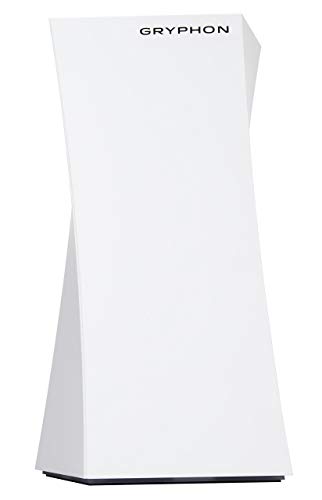
Gryphon Mesh WiFi Router AC3000 Tri-Band, Smart Wireless System with Parental Controls & Network Security Features, App Management, Coverage up to 3000 Sq Ft, for Home Use (Renewed)
Gryphon mesh router — network-level filtering that covers every device on the home wi-fi, including the ones with no parental control app at all.
How this category sells to you
- Fear-first marketing — Much of this category leads with the worst thing that could happen to any child anywhere. Buy for the specific job you need done, not the feeling the advert produced.
- Paying for what your phone already does — App limits, downtime, content filtering and purchase approval are free and built in on both platforms. A paid tool needs to do something beyond that list.
- Covert monitoring of an older child — It is technically easy and it is the decision most likely to backfire. A teenager who discovers secret surveillance generally stops bringing you problems — which was the actual protection.
- Assuming an app cannot be removed — On both platforms a determined teenager can often uninstall or disable an app-based monitor. Device-level and network-level tools are harder to shed than an app.
- Annual plans bought in a panic — Try monthly first. The most common outcome is that a household stops using the tool within a few weeks, whatever they paid.
How we choose
We start from the assumption that you should not buy anything here, then look for the specific jobs free built-in tools genuinely cannot do: cross-platform coverage, message and social content alerts, and controls that survive an uninstall. A paid tool earns a place only by doing one of those. We name what it costs in trust as well as money.
- Does something the free built-in tools cannot
- Names its limits rather than implying total coverage
- Survives a motivated uninstall, or says it does not
- Priced monthly, not fear-priced annually
- Does not require covert use to work
Every source we cite is checked against our criteria first — see how we check our sources.
Sources
Side by side
| Attribute | TeracubeThrive Kids Smart Phone | GryphonMesh WiFi Router AC3000 Tri-Band |
|---|---|---|
| Price | $129 | $249.99 |
| Availability | In stock | Check retailer |
Common questions
Part of the Parental Controls hub— the rest of our coverage in this category.